

















Running a Magento store isn’t just about having the right products or a fast checkout experience. It’s also about keeping your store safe, compliant, and trusted in an increasingly hostile digital environment.
Adobe releases Magento security patches to close vulnerabilities before attackers can exploit them. But the moment a patch is announced, hackers also know exactly what to look for in unpatched stores. This makes fast adoption non-negotiable.
In this comprehensive guide, we’ll cover everything you need to know about:
- What security patches in Magento actually are.
- Why 2025 has been an especially critical year for patching.
- How to check Magento security patches on your store.
- Step-by-step instructions on how to install Magento security patches.
- Why relying on a Magento development agency ensures business continuity.
- Common mistakes merchants make with patching.
- Case studies that show the risks of neglect.
By the end, you’ll be able to confidently plan a patching strategy that keeps your store secure, compliant, and profitable.
What Is a Security Patch in Magento?
The Basics
A security patch in Magento is a software update designed to fix a security weakness in the platform. If left unresolved, these weaknesses could allow attackers to:
- Steal customer data.
- Hijack administrator accounts.
- Crash the store with denial-of-service (DoS) attacks.
- Inject malicious code.
Patch Types You’ll Encounter
- Regular Security Patches – bundled with Adobe’s quarterly updates (like 2.4.7-p6).
- Hotfixes – emergency out-of-band updates for severe threats, such as the SessionReaper vulnerability in September 2025.
- B2B Module Patches – required for merchants using Adobe’s B2B functionality, since vulnerabilities often target business workflows.
Why Patches Differ from Upgrades
- Patch: Secures your current Magento version.
- Upgrade: Moves you to the next major release, often introducing new features and performance improvements.
While patches secure your current version, upgrades introduce broader improvements. If you’re considering a full version jump, follow this Magento upgrade checklist to avoid downtime and surprises.
The 2025 Security Landscape for Magento Stores

June 2025 (APSB25-50)
Adobe’s bulletin addressed vulnerabilities ranging from privilege escalation to arbitrary read issues. For attackers, this meant they could:
- Escalate low-level accounts into full admin control.
- Access sensitive configuration files.
Adobe’s June 2025 bulletin (APSB25-50) fixed critical issues from privilege escalation to arbitrary code execution. For a granular breakdown and impact analysis, see this Meetanshi deep dive.
August 2025 (APSB25-71)
A particularly severe set of vulnerabilities fixed:
- Denial-of-service (DoS) attacks that could knock stores offline.
- Information disclosure flaws that leaked sensitive server details.
September 2025 (APSB25-88: SessionReaper)
This emergency hotfix (CVSS 9.1) closed a session hijacking flaw that let attackers impersonate users without passwords. Adobe’s official APSB25-88 bulletin provides full technical details.
Exploiting this flaw meant an attacker could log in as a customer without knowing their password, leading to account takeovers and fraudulent purchases.
Why Security Patches Are Non-Negotiable
Compliance Risks
Not applying an Adobe Magento security patch can:
- Violate PCI DSS requirements.
- Trigger fines from payment processors.
- Lead to lawsuits if customer data is stolen.
Business Impact
- Revenue loss: Downtime during attacks costs thousands per hour.
- SEO damage: Google flags compromised sites, leading to traffic loss.
- Brand trust: Customers abandon stores that mishandle data.
Example Scenario
Imagine a store that failed to apply Magento 2.4.5 security patches. Hackers exploited the unpatched issue to steal customer emails and passwords. Within days, news spread on forums, and the business lost over 40% of daily orders due to trust issues.
How to Check Magento Security Patches
Command Line Method
Use:
bin/magento --versioncomposer show magento/product-community-edition
Match your version against Adobe’s latest release notes.
Adobe Patch Notes
Check Adobe’s official site for Magento 2 install security patches listings. Look for -p suffix versions (e.g., 2.4.7-p6).
Automated Patch Check Tools
Some Magento development companies offer patch audit tools that automatically check Magento security patches and email alerts when new ones are released.
How to Install Magento Security Patches
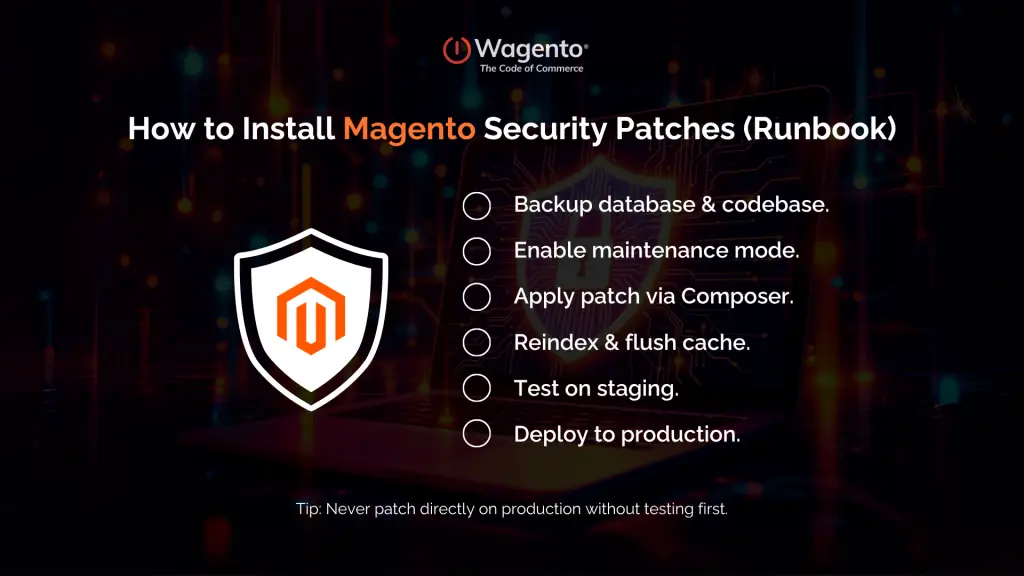
Standard Workflow
- Backups – Database + media + code.
- Enable Maintenance Mode – Prevent order disruption.
- Composer Update –
composer require magento/product-community-edition=2.4.7-p6 --no-updatecomposer updatebin/magento setup:upgradebin/magento cache:flush
- Reindex & Test – Run
bin/magento indexer:reindex. - Smoke Testing – Test checkout, login, payment gateways.
- Deploy to Production.
Handling Hotfixes
Hotfixes are installed similarly but may require applying patches manually to specific files.
Common Mistakes During Installation
- Skipping staging environment testing.
- Forgetting to clear caches after patching.
- Applying patches during peak traffic hours.
- Not involving a Magento developer, leading to broken extensions.
After applying a patch, always validate your checkout process. Even small conflicts can break conversions. Use this Magento checkout testing guidance to ensure a smooth buying experience post-patch.
Get Professional Patch Installation Support
Why Hire Magento Developers for Patch Management
Complexity of Magento Security Patch Installation
Magento patches often conflict with third-party extensions or custom modules. Skilled Magento developers resolve these conflicts without downtime.
Expertise That Scales with Your Business
Certified Magento developers bring specialized knowledge to ensure security patches are applied correctly, tested thoroughly, and deployed with minimal disruption. Whether you run a small D2C store or a large B2B commerce platform, expert guidance helps you avoid costly mistakes.
Beyond Security
Magento development services also cover:
- Performance tuning.
- Custom feature builds.
- Continuous integration for seamless updates.
Certified developers don’t just apply patches, they protect revenue. See how Wagento helped one retailer achieve an enterprise Magento success story while scaling securely.
Hire Magento Developers Today
Common Mistakes Merchants Make with Patching

1. Delaying Patches
Waiting “just a few weeks” can be fatal. Bots scan for vulnerable Magento sites within hours of Adobe’s announcements.
2. Assuming Hosting Providers Handle It
Unless you have a managed Magento hosting provider with patch SLAs, your host won’t apply patches for you.
3. Not Testing on Staging
Directly applying patches to production without testing leads to broken checkouts.
4. Ignoring Older Branches
Many merchants running Magento 2.4.5 security patches assume they’re safe. But without the latest -p patch, they remain exposed.
Case Study: Skipping a Magento Security Patch
A mid-sized fashion retailer ignored Adobe’s August 2025 bulletin because they thought the vulnerabilities “didn’t apply” to them.
- Within weeks, attackers used the DoS flaw to knock their site offline for 14 hours.
- The downtime cost them $75,000 in lost sales during a promotional campaign.
- Recovery required emergency work by a Magento development agency, costing an additional $20,000.
Lesson: Patch first. Pay later if you don’t.
Best Practices for Magento Security Patches in 2025
1. Apply Patches Immediately
Never wait. Vulnerabilities are publicly known once Adobe posts bulletins.
2. Use Staging Environments
Always test in a safe environment before deploying live.
3. Maintain Regular Backups
Before and after patching.
4. Monitor Adobe Bulletins
Subscribe to Adobe’s security bulletin emails.
5. Work With a Magento Development Agency
Agencies combine security patch Magento 2 expertise with broader Magento development services.
Strengthen Your Store with Wagento’s Magento Security Tool
Patching is a critical step, but ongoing protection requires continuous monitoring. That’s where the Wagento Security Tool comes in.
Built specifically for Magento, the tool helps you:
- Detect missing security patches and hotfixes.
- Identify exposed endpoints and configuration issues.
- Track vulnerabilities in third-party extensions.
- Receive real-time alerts when new risks appear.
By integrating this tool into your workflow, you ensure that threats are spotted early and resolved before they impact your customers or revenue. It’s a proactive way to stay secure between Adobe’s quarterly patch cycles.
FAQs
Your store remains vulnerable, risking breaches, downtime, and PCI non-compliance.
Yes, but older branches only receive limited patching. Upgrading is strongly recommended.
Check Adobe’s bulletin for your Magento version and compare it with your installed version.
Yes, Adobe provides them free. The cost is in installation (developer time).
Roughly every 2–3 months, plus emergency hotfixes.
No, always apply them during off-peak times to avoid disrupting customers.
You must upgrade—these versions no longer receive Magento 2 security patches.
Final Thoughts: Secure Your Magento Store in 2025
Cybersecurity isn’t optional—it’s foundational. In 2025, attacks are faster, more automated, and more devastating than ever. Adobe releases the tools you need to stay safe, but it’s up to you to act.
By applying every Magento security patch as soon as it’s released, you safeguard your:
- Customer trust.
- PCI compliance.
- Long-term revenue growth.
Don’t wait until attackers strike. Partner with a Magento development company that specializes in proactive patching, upgrades, and ongoing support.