



Customer expectations in 2026 demand more than good design and fast shipping.
Businesses need scalable architecture, AI-ready systems, connected data, and resilient performance to stay competitive. For many merchants, the path forward requires migration or replatforming.
This guide shows you how to move your eCommerce store without downtime, without losing SEO equity, and without creating unnecessary technical debt. Whether you are transitioning from Magento 1.x or 2.x, a custom-built legacy platform, or a CMS that has reached its limits, structured replatforming can unlock new growth for 2026 and beyond.
Ready to Plan a Zero-Disruption Migration?
A smooth migration starts with a solid roadmap. Our experts can help you evaluate your current system, fix technical debt, and plan your replatforming strategy.
Why Migrate in 2026? The Market, Technology, and Customer Demands Have Changed
Migration is no longer about “moving platforms.” It is about future-proofing your business.
1. Customer expectations are higher than ever
Shoppers want:
- Instant page loads
- Personalization powered by AI
- Unified cart and checkout experiences
- Mobile-first performance
- Real-time inventory and tracking
Legacy platforms can rarely support these expectations without heavy customization.
Modern platforms like Shopify Plus, BigCommerce, Adobe Commerce Cloud, and headless systems offer built-in speed, AI readiness, and seamless omnichannel integrations.
2. Technical debt is slowing businesses down
Many merchants still run:
- Magento 1 or severely outdated Magento 2 versions
- Custom-coded platforms with no documentation
- Legacy CMS systems that cannot integrate with modern tools
- Slow databases and fragile architecture
Technical debt raises operational cost, increases bugs, and limits your ability to innovate.
A migration is often the quickest path to reducing this burden.
3. AI and agentic workflows require modern architecture
2026 is the year where AI becomes foundational, not optional.
AI in commerce now powers:
- Automated merchandising
- Predictive search
- Personalization orchestration
- SKU enrichment
- Inventory forecasting
- Autonomous shopping agents
Platforms that support event-driven, composable, or headless models perform significantly better with AI integrations.
Migrating unlocks these capabilities and sets you up for growth beyond traditional eCommerce.
If you want to understand how headless architecture works on modern platforms, explore this guide on decoding headless commerce on BigCommerce which breaks down real use cases for scalable frontend experiences
4. Security, compliance, and performance standards have evolved
Outdated systems often fail in areas like:
- PCI compliance
- WCAG accessibility
- Core Web Vitals
- Modern security patching
- API performance
A replatforming project helps you adopt the latest standards with far less risk.
Migration vs Replatforming: What’s the Difference?
Many companies use these terms interchangeably, but they serve different goals.
Migration
This is a technical transfer of:
- Data
- Customers
- Orders
- Products
- URLs
- Content
- Integrations
The goal is to move from Point A to Point B smoothly.
Replatforming
This is a strategic transformation where you:
- Upgrade your technology
- Improve workflows
- Consolidate extensions
- Adopt newer tools
- Improve UX and performance
- Remove technical debt
Replatforming often includes a migration but goes further to modernize operations and unlock AI capabilities.
Explore the B2B ecommerce replatforming and migration guide for 2025 to understand what enterprise-grade transitions involve.
When Should You Consider Migration or Replatforming?
Many merchants wait too long, until problems are severe. Here are the most common triggers.
Your website is slow or unstable
High bounce rates, abandoned carts, and checkout failures indicate that your platform is no longer performing.
Your development costs keep rising
Legacy codebases need constant patching. New features take longer to implement.
You are spending more on maintenance than on innovation.
Your team struggles to integrate new tools
If connecting CRM, ERP, PIM, or AI tools requires heavy custom work, your platform may be holding you back.
You cannot support high traffic
Peak season failures, downtime, or throttled resources are common signals.
You want future-proof flexibility
Composable architecture and cloud-native commerce are becoming standard. Migrating early prevents costly overhauls later.
If you are still on an older Magento version, this Magento 2 upgrade checklist can help you understand how prepared your store is before starting a full migration.
How to Plan a Seamless Migration in 2026
A successful migration follows clear steps the industry has refined over the past decade.

Step 1: Audit your current platform
Review:
- Data structure
- Extensions and plugins
- Custom code
- Third-party connectors
- Frontend and backend performance
- Integrations
- Hosting and infrastructure
This gives you a clean picture of what needs to be moved or eliminated.
Many merchants reduce 30 to 70 percent of their technical debt just by removing old code during the audit.
Step 2: Choose the right future platform
Base the decision on:
- Scalability requirements
- Inventory size
- Global expansion plans
- POS needs
- B2B requirements
- AI-readiness
- Cost-to-maintain vs cost-to-scale
Platforms to consider:
- Adobe Commerce for enterprise-level control
- Shopify Plus for modern simplicity and speed
- BigCommerce for composable performance
- Headless / MACH for advanced flexibility
- Shopware for modular commerce and hybrid use cases
Step 3: Map and clean your data
Clean data reduces migration time and improves performance.
This stage includes:
- Removing duplicates
- Standardizing SKUs
- Cleaning customer profiles
- Fixing broken fields
- Consolidating product attributes
Good data makes your new platform work better from Day 1.
Step 4: Create a secure staging environment
The staging environment is where development and testing happen.
This prevents your live site from being disrupted.
Step 5: Rebuild the theme or frontend
Rather than copying your old design, use migration as a chance to:
- Improve UX
- Enhance page speed
- Build mobile-first layouts
- Adopt modern UI libraries
- Implement headless frameworks if needed
Step 6: Set up integrations
Connect your:
- ERP
- CRM
- PIM
- OMS
- Analytics
- Search and AI tools
- Marketing automation
- Subscription tools
In 2026, merchants rely on more integrations than ever.
Your new platform must support them natively or via stable APIs.
Step 7: Perform rigorous testing
Test:
- Checkout
- Payments
- Customer accounts
- Product pages
- Search
- Integrations
- Mobile view
- Speed
- Accessibility
- Redirects
- Analytics tracking
Quality assurance ensures no surprises on launch day.
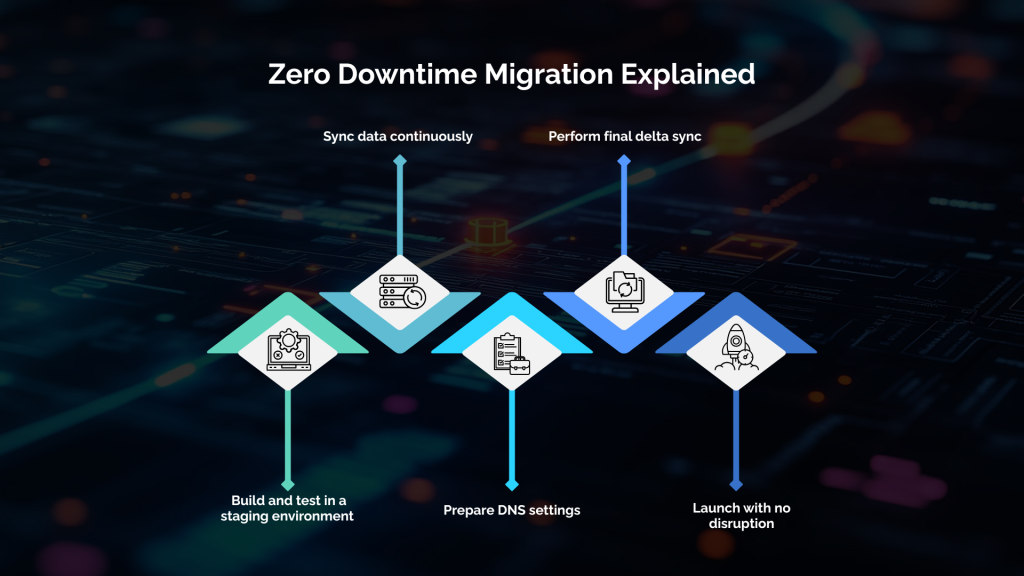
Step 8: Plan your zero-downtime launch
To minimize interruptions:
- Reduce DNS propagation delays
- Run synchronization for product and order data
- Freeze changes only when necessary
- Move traffic gradually if needed
- Put monitoring tools in place
A migration that preserves uptime protects revenue and customer trust.
Step 9: Post-launch monitoring and optimization
After going live, monitor:
- Performance
- User behavior
- API logs
- Conversion rates
- Analytics tracking
- Search performance
This ensures the new platform outperforms the old one as quickly as possible.
Learn the full step-by-step guide to migrate your eCommerce store for growth using BigCommerce’s 2025 migration playbook.
Get a Migration Roadmap Tailored to Your Store
Need a personalized platform recommendation and migration plan? Our solution architects will analyze your stack and guide you through the best path forward.
How to Ensure SEO-Safe Migration in 2026
SEO loss is the biggest fear merchants have during migration. The good news is that it is completely preventable.
Build a complete redirect map
Match every old URL to its new version.
This preserves SEO authority and protects rankings.
Maintain metadata and content parity
Duplicate:
- Meta titles
- Meta descriptions
- Schema
- H1 / H2 structure
- Body content
Content continuity keeps Google happy.
Keep the same URL structure whenever possible
Changing URLs may confuse search engines. Avoid unnecessary modifications.
Preserve internal links
Internal links guide crawlers.
Maintain or improve them in your new setup.
Revalidate your sitemap and robots
Check:
- Redirect chains
- Site indexing
- Canonical tags
- Sitemap submissions
This ensures a clean transition.
Zero-Downtime Migration: What It Really Means
Zero downtime is not magic. It is engineering.
Platforms like Shopify Plus, BigCommerce, and modern cloud hosting allow:
- Clone environments
- Automated deployments
- Parallel order syncing
- Staged cutover
- No traffic interruption
If your migration is planned correctly, customers never notice the change.
AI-Assisted Migrations and Agentic Workflows
AI is changing how migrations work.
AI now assists with data cleanup
AI tools identify:
- Duplicate SKUs
- Inconsistent attributes
- Missing product fields
- Low-quality product images
- Incorrect category mapping
This reduces weeks of manual work.
AI powers content migration and transformation
AI can:
- Rewrite product descriptions
- Improve SEO titles
- Generate missing metadata
- Standardize naming conventions
- Enrich product attributes
Agentic workflows automate migration staging
Agentic systems can automatically:
- Sync product data
- Test redirects
- Validate speed
- Detect UI issues
- Report integration failures
This improves accuracy and reduces time-to-launch.
For real-world insights on how AI and autonomous agents are transforming the buyer journey, explore this article on AI shopping agents which demonstrates why AI-ready platforms are becoming essential.
Common Mistakes to Avoid When Migrating
Not cleaning your data beforehand
Dirty data leads to slow queries and broken listings.
Over-customizing your build
Most modern platforms solve problems without custom code.
Forgetting about SEO mapping
SEO loss can take months to recover.
Rushing the timeline
Quality assurance cannot be skipped.
Choosing a platform based on features alone
Always consider long-term scalability and AI readiness.
What Successful Stores Gain After Migration
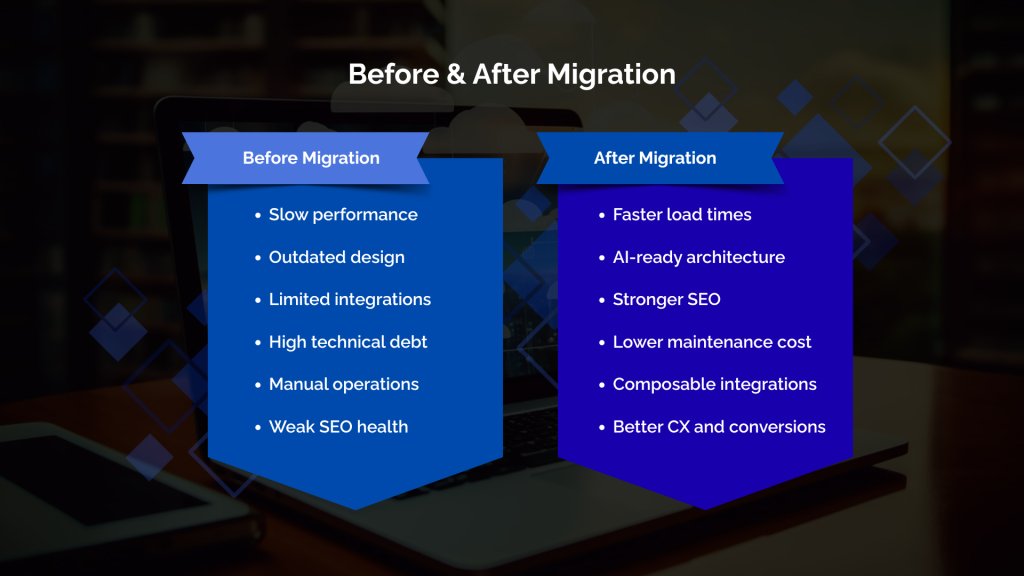
Faster performance and higher conversions
Speed improvements lead to more sales.
Lower operational costs
Technical debt disappears. Maintenance becomes predictable.
Better team productivity
Clean systems reduce friction. Integrations work better.
Higher scalability
Modern platforms auto-scale for peak traffic.
Improved security and compliance
Fewer vulnerabilities and stronger protection.
AI and automation become accessible
Migration unlocks new capabilities instantly.
Conclusion
A successful migration does more than move your store from one platform to another. It removes years of technical debt, stabilizes performance, supports AI and automation, improves customer experience, and sets your business up for scalable growth. The brands that evolve now will outperform those that wait until their systems fail.
If modernization, speed, efficiency, and future-proof architecture are priorities for your business, now is the time to move. With the right migration strategy and a team that understands how to protect your SEO, minimize downtime, and optimize your new platform, replatforming becomes a powerful opportunity to strengthen your entire eCommerce ecosystem.
Let Us Help You Migrate Without Downtime
Move your store to a platform built for growth, performance, and the future of commerce.
FAQs
1. How long does an eCommerce migration take?
Projects typically take 6 to 14 weeks depending on complexity, number of integrations, and data volume.
2. Will I lose SEO rankings after migration?
No. If best practices are followed, your rankings and traffic remain stable or improve.
3. What is the safest platform to migrate to?
It depends on your business. Shopify Plus, BigCommerce, Adobe Commerce, and headless platforms all serve different needs.
4. Can I migrate without downtime?
Yes. With staged deployment and DNS strategy, downtime can be zero or near zero.
5. Will my integrations work after migration?
Yes, but many merchants upgrade or replace integrations during the process to improve performance.